Shell Script Execution

With SQL Commander, you can run your SQL code in command-line mode (also known as batch mode, shell mode, etc.)

Supported Commands

-scriptfile “FILENAME” “DBMS > CONNECTION > DATABASE”

The command runs SQL code, saved to a text file. It is equal to click on Execute button in main window of the app, with “Run as Script” option turned on. Parameters:

  • FILENAME – full file path and name with extension to be executed.
  • DBMS > CONNECTION > DATABASE – path to the database the SQL script must be executed on.

Examples:

“C:\Program Files\SQL Commander\SQLCommander.64.exe” -scriptfile “D:\SQL\batch.sql” “PostgreSQL > PG_v16.2 > pagila”

“C:\Program Files (x86)\SQL Commander\SQLCommander.32.exe” -scriptfile “D:\cmd.sql” “SQLite > sqlite3 > main”

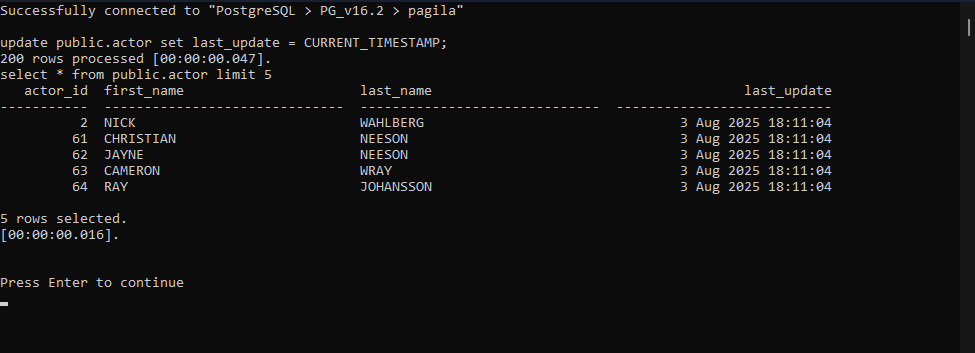
All script commands, possible errors, as well as server messages and output datasets will be shown in the console window:

sql batch mode

More Commands To Be Implemented

  • Silent mode (saving errors and messages to a log file).
  • Run a single ad-hoc SQL query instead of a whole script file.
  • If you have some ideas, or you need particular command line functionality – please contact us.
Scroll to Top