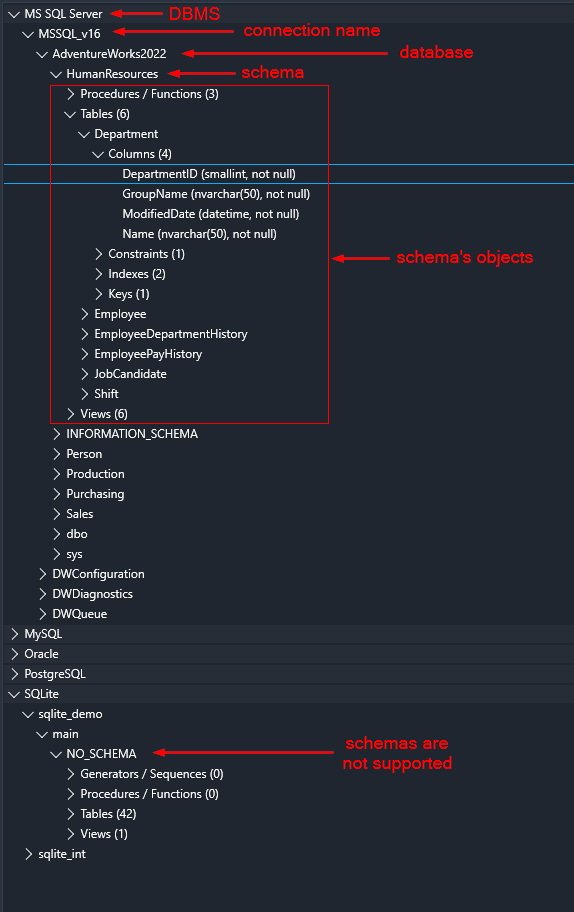
The Database Tree (on the left-side of main window) contains metadata of databases you’ve established connection to. The structure of tree items is equal for any of supported DBMS:
As you can see on the picture above, if a DBMS do not support schemas (like SQLite or Firebird), NO_SCHEMA label is used.
Click on a chevron symbol (or double-click an item) to expand or collapse its child nodes. In case of collapsing, all child nodes will be collapsed as well.
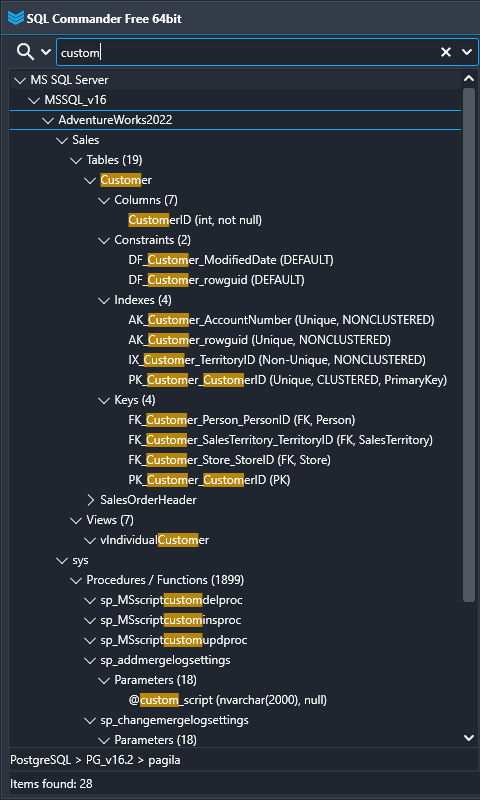
Search Database Objects
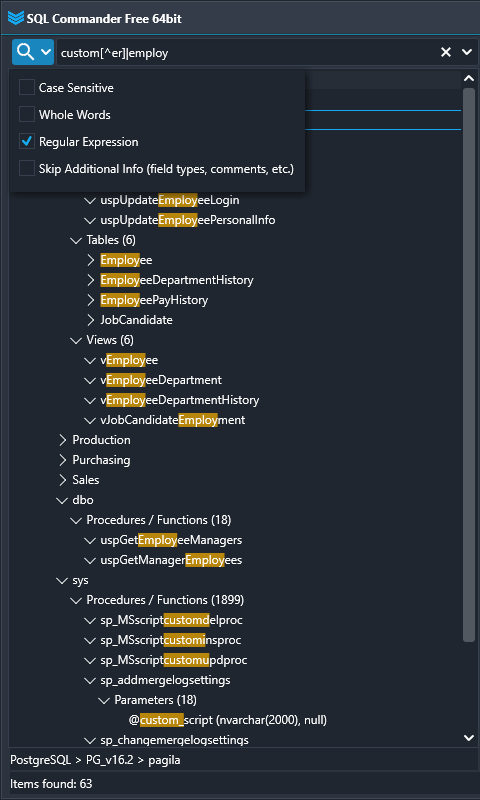
In order to search only within particular database or schema, click on it, then type your search text in the field above the tree, and press Enter key:
As you can see on the picture above, you can use various search options. In current example, the regular expression was used to find ‘custom’ (but not ‘customer’) or ’employ’ phrase. The regular expression flavor used in SQL Commander is PCRE.
DB Tree Context Menu
Press F2 key to show current DB object name in an editor to be able to copy it.
Press “/” key to quick jump to the search bar.
New Query – applicable for a database or any of its objects. Opens new SQL tab connected to the DB.
Open Table – runs SQL query with limitation for returned rows (1000 by default) and opens the table in a new tab, so you could view and edit it.
Script -> CREATE – generates DDL script for current object, if applicable.
Script -> SELECT – generates DQL script (applicable only for tables and views).
Set Database as Default – sets the DB that will be used when you create a new SQL query tab by “+” tool button (Ctrl+N shortcut).
Copy Full Path – copies path to the object in format [DBMS].[CONNECTION].[DATABASE].[SCHEMA].[TABLE] for using in cross-DBMS queries.
Refresh – For Oracle, MySQL, MS SQL Server, and PostgreSQL refreshes all the database’s metadata. For all others – refreshes only selected object.
Notes
In MySQL, schema name is equal to database name, so we can say that schemas are not supported. Thus, in the DB Tree you’ll see NO_SCHEMA label.
In case of file-based DBMS (like Firebird, MS Access, MS Excel file, etc.) the database name will be full path to the file, including extension. For SQLite, database name is always ‘main‘.
If (for some reason) you’re missing an object in the DB Tree, but you’re able to connect to the database – this won’t affect SQL execution functionality. Queries and scripts run independently of the tree.